This one is organised by Lantronix to promote their XPort Pro, world’s smallest Linux computer (according to Lantronix).
The contest is open to all individuals with interest in network technology, including businesses, university faculty, students, research labs, engineers and design contractors. There is no limit to the number of entries per person or organisation. Prizes of $6,000 and $3,000 will be awarded to the two top entries for Best Linux Design, and a separate prize of $3,000 for the Best Student Linux Design.
To enter you have to buy an XPort Pro evaluation kit for $99. This is bearable, but will probably limit the number of participants.
Thursday, February 18, 2010


Tuesday, February 16, 2010
Become a beta tester and win
It is contest time. I allready mentioned the Luminary, sorry, I mean Stellaris ARM contest from Texas Instruments together with Circuit Cellar and a week later the LPCXpresso ARM contest by NXP. Now it is Freescale who organises a contest. OK, this is not a very difficult contest and you don't have to design anything, but you can win some smart prizes.
To participate you only have to enter the CodeWarrior Development Studio 10.0 beta test program. Free access to the beta release, including full documentation and task-based videos are available for a limited time at www.freescale.com/cwmcu10. CodeWarrior integrates the development tools for the RS08, HCS08 and ColdFire architectures into a single product based on the Eclipse open development platform. Since this is a beta release, it cannot be used for the development of production products. However, you are encouraged to explore the functionality of this new development environment.
To recognize your participation, on April 12, 2010 Freescale will be drawing names from the pool of beta testers for three exciting prize packages:
- Canon Rebel digital single-lens reflex (SLR) camera
- Wii game console by Nintendo
- Garmin handheld GPS
So, go get that 500+ MB download and win that camera!
P.S. You have to submit feedback through a Freescale Service Request to really enter. Alternatively, participants may send an email with name, address (including zip code), home and work telephone numbers (including area codes) to r63076@freescale.com.
To participate you only have to enter the CodeWarrior Development Studio 10.0 beta test program. Free access to the beta release, including full documentation and task-based videos are available for a limited time at www.freescale.com/cwmcu10. CodeWarrior integrates the development tools for the RS08, HCS08 and ColdFire architectures into a single product based on the Eclipse open development platform. Since this is a beta release, it cannot be used for the development of production products. However, you are encouraged to explore the functionality of this new development environment.
To recognize your participation, on April 12, 2010 Freescale will be drawing names from the pool of beta testers for three exciting prize packages:
- Canon Rebel digital single-lens reflex (SLR) camera
- Wii game console by Nintendo
- Garmin handheld GPS
So, go get that 500+ MB download and win that camera!
P.S. You have to submit feedback through a Freescale Service Request to really enter. Alternatively, participants may send an email with name, address (including zip code), home and work telephone numbers (including area codes) to r63076@freescale.com.
Sunday, February 7, 2010
LPCXpresso design contest
Last week I received two LPCXpresso boards designed by Embedded Artists for evaluation. An LPCXpresso board is a small but longish 35 by 140 mm board split in two parts. One part has an ARM Cortex (M0 or M3) processor from NXP (LPC1114 or LPC1343) on it, together with a 12 MHz crystal and a small prototyping area. The other part of the board is the LPC-Link, which is a real JTAG programmer/debugger. This part is a sort of detachable JTAG pod and if you cut the connections between the two rows of JTAG connector pads you can connect it to other compatible hardware, your own ARM board for instance.
Why is this interesting? Well, first of all because of the price, since Embedded Artists sells it for only 20 euros. This means that you can get yourself a JTAG debugger for a very good price.
Then there are the development tools (Windows only, but should also work on virtual platforms with USB support on other operating systems). The boards are supported by a free enhanced Eclipse-based IDE developed by Code Red. This software lets you compile programs of unlimited size, but program and debug only up to 128 KB. The NXP web site has a list of compatible processors which is unfortunately missing the LPC2148, but according to NXP it should work with unlisted controllers too, as long as you respect the 128 KB limit. I have yet see this as the IDE does not allow picking an incompatible controller and an LPC2142 is not an LPC2148.

LPCXpresso LPC1114 together with an mbed module and the mbed pin-out card. Everything on the left of the pin-out card is the LPC-link JTAG pod.
Note that the LPCXpresso is pin compatible with an mbed board. That may seem strange as an mbed module only has 40 pins whereas an LPCXpresso has 54, but pin 1 to 20 and pin 28 to 47 of the LPCXpresso module have (where possible) the same functionality as the mbed pins. One problem though, the mbed processors (LPC1768 and LPC2368) are not supported by the LPCXpresso IDE. I have been told though that a Cortex-M0 mbed is coming soon.
Also interesting is that NXP has launched a design contest. Anyone entering a valid design concept before the 8th of March 2010 will receive a free LPCXpresso development kit and then has about one month to actually build it and show that it works. Check out all the details here.
Why is this interesting? Well, first of all because of the price, since Embedded Artists sells it for only 20 euros. This means that you can get yourself a JTAG debugger for a very good price.
Then there are the development tools (Windows only, but should also work on virtual platforms with USB support on other operating systems). The boards are supported by a free enhanced Eclipse-based IDE developed by Code Red. This software lets you compile programs of unlimited size, but program and debug only up to 128 KB. The NXP web site has a list of compatible processors which is unfortunately missing the LPC2148, but according to NXP it should work with unlisted controllers too, as long as you respect the 128 KB limit. I have yet see this as the IDE does not allow picking an incompatible controller and an LPC2142 is not an LPC2148.

LPCXpresso LPC1114 together with an mbed module and the mbed pin-out card. Everything on the left of the pin-out card is the LPC-link JTAG pod.
Note that the LPCXpresso is pin compatible with an mbed board. That may seem strange as an mbed module only has 40 pins whereas an LPCXpresso has 54, but pin 1 to 20 and pin 28 to 47 of the LPCXpresso module have (where possible) the same functionality as the mbed pins. One problem though, the mbed processors (LPC1768 and LPC2368) are not supported by the LPCXpresso IDE. I have been told though that a Cortex-M0 mbed is coming soon.
Also interesting is that NXP has launched a design contest. Anyone entering a valid design concept before the 8th of March 2010 will receive a free LPCXpresso development kit and then has about one month to actually build it and show that it works. Check out all the details here.
Thursday, January 28, 2010
Will the new Bill Gates please stand up?
Circuit Cellar together with Texas Instruments have launched a design contest around the Stellaris LM3S9B96 microcontroller. This 100 pin controller is based on a 32-bit ARM Cortex–M3 core with 256 KB flash memory, 96 KB RAM and it sports many interesting features like CAN, USB 2.0 OTG/Host/Device, 10/100 Ethernet MAC and PHY, I2C, I2S, SSI, UART, PWM, ADC and some other peripherals. Although this is more or less what you would expect from a modern 32-bit microcontroller, it is not all: the device also has a built-in library with almost 400 functions to access its peripherals. This BIOS (Basic Input Output System) provides a nice hardware abstraction layer for almost all of the registers and makes life of the programmer much easier.
To top thing off, the device also has a built in real time operating system (RTOS)! According to the datasheet the controller has a copy of SafeRTOS inside, a secure version of FreeRTOS edited by Wittenstein. Unfortunately, the datasheet isn’t very verbose about it, but it is there.
Now what do you call a processor with peripherals, a BIOS and an operating system? A computer! Indeed, this microcontroller is pretty much like a computer on a chip (CoC) and the only thing missing is a graphical interface, but that is probably just a matter of time and/or pin count.
Are we entering a new era of microcontrollers? Will this be the new standard architecture for the next generation of microcontrollers? What about code portability? Will the user get access to the source code of the built-in BIOS and RTOS? Will ARM, TI & Wittenstein be the next Intel, AMD and Microsoft?
At the end of 2008 I assisted at an ARM conference in Paris. The buzz word then was "code portability". If only everybody would be using ARM-based processors, then code would be easily portable from one device to another. Luminary, the developper and former owner of the Stellaris processors, was present too. But is the BIOS & RTOS they now put in their devices good for code portability? Will other ARM-based microcontroller manufacturers too integrate a compatible BIOS & RTOS in their devices or provide compatible libraries? Or are we going to have to deal with tens of different BIOS-es and RTOS-es in the future, supported by code bloating tests to figure out what the heck the platform actually used is capable off?
Devices will get bigger and will integrate more and more. Within a couple of years they will be as powerfull as a modern PC is now, with built-in BIOS and OS. This all smells so much of Microsoft and the OS wars from the past years.
NOOOOOOOoooo!!!!!
Please, not again!
To top thing off, the device also has a built in real time operating system (RTOS)! According to the datasheet the controller has a copy of SafeRTOS inside, a secure version of FreeRTOS edited by Wittenstein. Unfortunately, the datasheet isn’t very verbose about it, but it is there.
Now what do you call a processor with peripherals, a BIOS and an operating system? A computer! Indeed, this microcontroller is pretty much like a computer on a chip (CoC) and the only thing missing is a graphical interface, but that is probably just a matter of time and/or pin count.
Are we entering a new era of microcontrollers? Will this be the new standard architecture for the next generation of microcontrollers? What about code portability? Will the user get access to the source code of the built-in BIOS and RTOS? Will ARM, TI & Wittenstein be the next Intel, AMD and Microsoft?
At the end of 2008 I assisted at an ARM conference in Paris. The buzz word then was "code portability". If only everybody would be using ARM-based processors, then code would be easily portable from one device to another. Luminary, the developper and former owner of the Stellaris processors, was present too. But is the BIOS & RTOS they now put in their devices good for code portability? Will other ARM-based microcontroller manufacturers too integrate a compatible BIOS & RTOS in their devices or provide compatible libraries? Or are we going to have to deal with tens of different BIOS-es and RTOS-es in the future, supported by code bloating tests to figure out what the heck the platform actually used is capable off?
Devices will get bigger and will integrate more and more. Within a couple of years they will be as powerfull as a modern PC is now, with built-in BIOS and OS. This all smells so much of Microsoft and the OS wars from the past years.
NOOOOOOOoooo!!!!!
Please, not again!
Saturday, January 23, 2010
Worldwide Serial Web
You may have heard of WIZnet, the Korean company that makes several embedded Ethernet controllers with an integrated hardwired TCP/IP stack. Their flagship, the W7100, also has an 8051 compatible processor inside. They not only make & sell chips, they also sell modules, evaluation boards and even complete products that use their chips. These modules allow you to add Ether- & Internet connectivity to your project without much headache. WIZnet now also offers a great free (you have to register to get a serial number) software tool that lets you connect to serial ports over a network.
This tool called WIZ VSP (for Virtual Serial Port) is pretty cool indeed. It lets you install up to 99 real or virtual COM ports (the documentation talks about 255, but the software doesn’t let you go higher then COM99), as a server, a client or a shared port. A server will wait for clients to connect to it. A client connects to a server. The shared port uses UDP instead of TCP and will talk to one remote host and listen on a port.
A server supports multiple clients. This means that you can distribute data received on the server COM port to multiple clients that can all talk to the server. Such a configuration can be useful as a serial port concentrator, for instance.
The shared port over UDP can do the same thing as a server, except that it is connectionless. It also only talks to one other host (but listens to anyone talking to him), unless you specify a broadcast address.
I’ve tried the tool and it works remarkably well. The documentation is a bit cryptic at some points and the fact that I used one PC under Windows Vista complicated matters a bit, but in the end I managed to transmit serial data between two PCs in al three configurations. Here is how to do it:
First download the software and the manual (separate download!) and install the program. Then request a serial number by sending an email to the indicated address. When you get the serial (you may have to answer some questions) enter it when the program asks for it (without serial it will NOT work). Now you can start creating serial servers and clients.
On the “Create Connection” tab select the type of connection and the number of the serial port. Note that if the serial port exists in hardware, i.e. is real (can be a USB type or Bluetooth) you can clear the checkbox “Create as virtual serial port”. This way the software will use the real port and you can specify the serial port parameters (baudrate, data bits, etc.) on the “Connection prefs” tab. Depending on the connection type you will have to specify a host IP and a port number. You can configure some more on the other tabs and once you’re done, click the “Create connection” button. If the port did not yet exist you will now hear the typical Windows add-new-hardware sound and the port shows up in the tree display. To edit a created port you have to use the “Edit connection” tab.
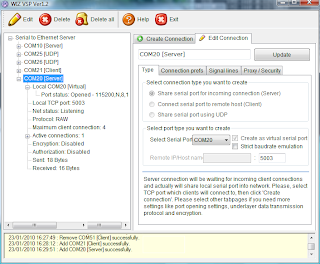
This shows the server setup on a Vista PC.
On another PC you do the same thing, but complementary. If you created a server on the first, create a client on the second. If you created a UDP connection on the first PC, you should create also a UDP connection on the second. Make sure to specify the right host IP numbers and to use the same port numbers on both PCs. Also better switch of any firewalls. I had to do that on the Vista PC before my XP PC would receive any data even though Vista did receive without any problem.
BTW, as host IP it is also possible to specify “localhost”. This way you can make serial ports on the same PC talk to each other.
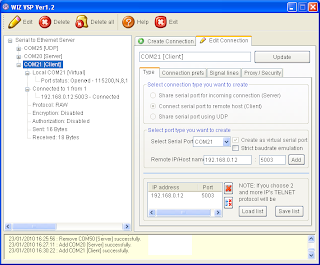
Here is the XP client that talks to the Vista PC.
To familiarize yourself with the tool I suggest to first only use virtual ports and a terminal program. This way you can type and see what happens.
Once you know how to properly setup WIZ VSP, your application can use a serial port on another PC, anywhere in the world! Or a serial device (f.i. a GPS) can transmit data to multiple hosts. I am sure you can come up with some other useful configuration. This is a very powerful tool and anyone using serial ports should get a copy of it. Now!
Oh, one more thing. Once the connections are established you can close the program without killing them.
This tool called WIZ VSP (for Virtual Serial Port) is pretty cool indeed. It lets you install up to 99 real or virtual COM ports (the documentation talks about 255, but the software doesn’t let you go higher then COM99), as a server, a client or a shared port. A server will wait for clients to connect to it. A client connects to a server. The shared port uses UDP instead of TCP and will talk to one remote host and listen on a port.
A server supports multiple clients. This means that you can distribute data received on the server COM port to multiple clients that can all talk to the server. Such a configuration can be useful as a serial port concentrator, for instance.
The shared port over UDP can do the same thing as a server, except that it is connectionless. It also only talks to one other host (but listens to anyone talking to him), unless you specify a broadcast address.
I’ve tried the tool and it works remarkably well. The documentation is a bit cryptic at some points and the fact that I used one PC under Windows Vista complicated matters a bit, but in the end I managed to transmit serial data between two PCs in al three configurations. Here is how to do it:
First download the software and the manual (separate download!) and install the program. Then request a serial number by sending an email to the indicated address. When you get the serial (you may have to answer some questions) enter it when the program asks for it (without serial it will NOT work). Now you can start creating serial servers and clients.
On the “Create Connection” tab select the type of connection and the number of the serial port. Note that if the serial port exists in hardware, i.e. is real (can be a USB type or Bluetooth) you can clear the checkbox “Create as virtual serial port”. This way the software will use the real port and you can specify the serial port parameters (baudrate, data bits, etc.) on the “Connection prefs” tab. Depending on the connection type you will have to specify a host IP and a port number. You can configure some more on the other tabs and once you’re done, click the “Create connection” button. If the port did not yet exist you will now hear the typical Windows add-new-hardware sound and the port shows up in the tree display. To edit a created port you have to use the “Edit connection” tab.

This shows the server setup on a Vista PC.
On another PC you do the same thing, but complementary. If you created a server on the first, create a client on the second. If you created a UDP connection on the first PC, you should create also a UDP connection on the second. Make sure to specify the right host IP numbers and to use the same port numbers on both PCs. Also better switch of any firewalls. I had to do that on the Vista PC before my XP PC would receive any data even though Vista did receive without any problem.
BTW, as host IP it is also possible to specify “localhost”. This way you can make serial ports on the same PC talk to each other.

Here is the XP client that talks to the Vista PC.
To familiarize yourself with the tool I suggest to first only use virtual ports and a terminal program. This way you can type and see what happens.
Once you know how to properly setup WIZ VSP, your application can use a serial port on another PC, anywhere in the world! Or a serial device (f.i. a GPS) can transmit data to multiple hosts. I am sure you can come up with some other useful configuration. This is a very powerful tool and anyone using serial ports should get a copy of it. Now!
Oh, one more thing. Once the connections are established you can close the program without killing them.
Friday, January 15, 2010
Energy harvesting power supply
This week I came across an interesting new product from Linear Technology: the LTC3588 energy harvesting power supply intended for powering remote microcontroller systems. According to the product description this chip is a complete energy harvesting solution optimized for low energy sources, including piezoelectric transducers.
A buzzer?
The LTC3588 datasheet does mention some manufacturers of piezoelectric transducers that can be used with the chip. I looked one up: the T220-A4-503X from Piezo Systems. As I allready suspected, it is not really a buzzer. It is also more expensive than a buzzer: $125. You can buy a lot of batteries for that money, but it is probably cheaper than to send out a maintenance engineer to replace a dead battery. This particular transducer can deliver 5.4 mW RMS when it vibrates ±1.57 mm at 80 Hz. It comes as a 0.5 mm thick card of 31.8 x 63.5 mm (1.25" x 2.5") that has to be soldered with special solder (the transducer has nickel electrodes).
OK, so this kind of piezoelectric transducers is probably not for me, but the LTC3588 datasheet shows other ways of using the chip: with a solar panel or a thermoelectric transducer or as an electric field harvester.
I like the last one. It uses two 30 x 60 cm (12" x 24") sheets of copper at about 15 cm (6") from a 60 x 120 cm (2' x 4') fluorescent light fixture. At such a short distance you might as well wire the chip directly to the light fixture supply, right? Luckily the datasheet also shows you how to do that.
Yet the LTC3588 seems like a pretty interesting chip and I ordered some samples. I will let you know if I get them and if I did, what I managed to do with them.
LTC3588 datasheet
Piezo Systems
A nice introduction to piezoelectric transducers
A buzzer?
The LTC3588 datasheet does mention some manufacturers of piezoelectric transducers that can be used with the chip. I looked one up: the T220-A4-503X from Piezo Systems. As I allready suspected, it is not really a buzzer. It is also more expensive than a buzzer: $125. You can buy a lot of batteries for that money, but it is probably cheaper than to send out a maintenance engineer to replace a dead battery. This particular transducer can deliver 5.4 mW RMS when it vibrates ±1.57 mm at 80 Hz. It comes as a 0.5 mm thick card of 31.8 x 63.5 mm (1.25" x 2.5") that has to be soldered with special solder (the transducer has nickel electrodes).
OK, so this kind of piezoelectric transducers is probably not for me, but the LTC3588 datasheet shows other ways of using the chip: with a solar panel or a thermoelectric transducer or as an electric field harvester.
I like the last one. It uses two 30 x 60 cm (12" x 24") sheets of copper at about 15 cm (6") from a 60 x 120 cm (2' x 4') fluorescent light fixture. At such a short distance you might as well wire the chip directly to the light fixture supply, right? Luckily the datasheet also shows you how to do that.
Yet the LTC3588 seems like a pretty interesting chip and I ordered some samples. I will let you know if I get them and if I did, what I managed to do with them.
LTC3588 datasheet
Piezo Systems
A nice introduction to piezoelectric transducers
Thursday, January 7, 2010
Accelerometers
Freescale announced this week their latest accelerometer MMA7660FC. This is a 3-axis digital output (I2C), very low power, low profile capacitive micro machined accelerometer featuring a low pass filter, compensation for 0g offset and gain errors, and conversion to 6-bit digital values at a user configurable output data rate. It offers low-power operation of 47 µA at 1 sample per second. The device can be used for sensor data changes, product orientation, and gesture detection through an interrupt pin.
Cool!
The product description ends with: "The device is housed in an extremely small 3 mm x 3 mm x 0.9 mm DFN package."
Bummer...
Elektor will present very soon its mobile 32-bit platform Sceptre which includes, amongst others, a 3D accelerometer from Freescale. For the Sceptre I have spent a lot of time looking for hand-solderable accelerometers but without success. Do easy to solder accelerometers actually exist? I guess not, but maybe someone will know of one and tell me about it. A more useful question is probably:
Do you have a technique for reliably soldering QFN or DFN packages by hand?
This question interests me very much, and, I am sure, many other people as well.
Here is a picture of the Sceptre that I sneaked out of the lab.
Hot, hot, hot!!!

This is one of the first three prototypes and it still works (one died during temperature testing). A second version that fixes some bugs and adds some improvements is on its way.
The accelerometer is the little black square in the left lower corner of the board (its a QFN unfortunately). On the top right is a Bluetooth module and if you look well enough you can see on the left an SD card sticking out from the bottom of the card. It runs from a mobile phone batterie and a charger for it is included on the board.
Stay tuned!
Cool!
The product description ends with: "The device is housed in an extremely small 3 mm x 3 mm x 0.9 mm DFN package."
Bummer...
Elektor will present very soon its mobile 32-bit platform Sceptre which includes, amongst others, a 3D accelerometer from Freescale. For the Sceptre I have spent a lot of time looking for hand-solderable accelerometers but without success. Do easy to solder accelerometers actually exist? I guess not, but maybe someone will know of one and tell me about it. A more useful question is probably:
Do you have a technique for reliably soldering QFN or DFN packages by hand?
This question interests me very much, and, I am sure, many other people as well.
Here is a picture of the Sceptre that I sneaked out of the lab.
Hot, hot, hot!!!

This is one of the first three prototypes and it still works (one died during temperature testing). A second version that fixes some bugs and adds some improvements is on its way.
The accelerometer is the little black square in the left lower corner of the board (its a QFN unfortunately). On the top right is a Bluetooth module and if you look well enough you can see on the left an SD card sticking out from the bottom of the card. It runs from a mobile phone batterie and a charger for it is included on the board.
Stay tuned!
Subscribe to:
Comments (Atom)
