You may have heard of WIZnet, the Korean company that makes several embedded Ethernet controllers with an integrated hardwired TCP/IP stack. Their flagship, the W7100, also has an 8051 compatible processor inside. They not only make & sell chips, they also sell modules, evaluation boards and even complete products that use their chips. These modules allow you to add Ether- & Internet connectivity to your project without much headache. WIZnet now also offers a great free (you have to register to get a serial number) software tool that lets you connect to serial ports over a network.
This tool called
WIZ VSP (for Virtual Serial Port) is pretty cool indeed. It lets you install up to 99 real or virtual COM ports (the documentation talks about 255, but the software doesn’t let you go higher then COM99), as a server, a client or a shared port. A server will wait for clients to connect to it. A client connects to a server. The shared port uses UDP instead of TCP and will talk to one remote host and listen on a port.
A server supports multiple clients. This means that you can distribute data received on the server COM port to multiple clients that can all talk to the server. Such a configuration can be useful as a serial port concentrator, for instance.
The shared port over UDP can do the same thing as a server, except that it is connectionless. It also only talks to one other host (but listens to anyone talking to him), unless you specify a broadcast address.
I’ve tried the tool and it works remarkably well. The documentation is a bit cryptic at some points and the fact that I used one PC under Windows Vista complicated matters a bit, but in the end I managed to transmit serial data between two PCs in al three configurations. Here is how to do it:
First download the software and the manual (separate download!) and install the program. Then request a serial number by sending an email to the indicated address. When you get the serial (you may have to answer some questions) enter it when the program asks for it (without serial it will NOT work). Now you can start creating serial servers and clients.
On the “Create Connection” tab select the type of connection and the number of the serial port. Note that if the serial port exists in hardware, i.e. is real (can be a USB type or Bluetooth) you can clear the checkbox “Create as virtual serial port”. This way the software will use the real port and you can specify the serial port parameters (baudrate, data bits, etc.) on the “Connection prefs” tab. Depending on the connection type you will have to specify a host IP and a port number. You can configure some more on the other tabs and once you’re done, click the “Create connection” button. If the port did not yet exist you will now hear the typical Windows add-new-hardware sound and the port shows up in the tree display. To edit a created port you have to use the “Edit connection” tab.
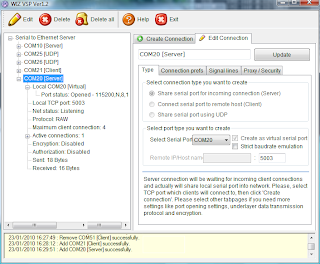
This shows the server setup on a Vista PC.
On another PC you do the same thing, but complementary. If you created a server on the first, create a client on the second. If you created a UDP connection on the first PC, you should create also a UDP connection on the second. Make sure to specify the right host IP numbers and to use the same port numbers on both PCs. Also better switch of any firewalls. I had to do that on the Vista PC before my XP PC would receive any data even though Vista did receive without any problem.
BTW, as host IP it is also possible to specify “localhost”. This way you can make serial ports on the same PC talk to each other.
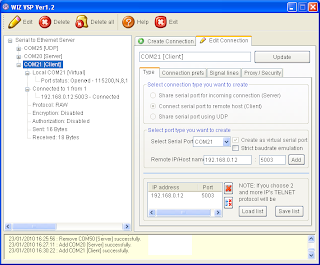
Here is the XP client that talks to the Vista PC.
To familiarize yourself with the tool I suggest to first only use virtual ports and a terminal program. This way you can type and see what happens.
Once you know how to properly setup WIZ VSP, your application can use a serial port on another PC, anywhere in the world! Or a serial device (f.i. a GPS) can transmit data to multiple hosts. I am sure you can come up with some other useful configuration. This is a very powerful tool and anyone using serial ports should get a copy of it.
Now!Oh, one more thing. Once the connections are established you can close the program without killing them.


